
What Is TypeCircuit?
TypeCircuit is a free daily typing speed game that challenges players to complete a circuit of three quotes as quickly and accurately as possible. Instead of guessing words or solving traditional puzzles, players race against the clock by typing passages taken from popular video games, movies, and anime.
Each day brings a new selection of quotes. Your objective is to reproduce the displayed text while maintaining a high words-per-minute (WPM) score and making as few typing mistakes as possible.
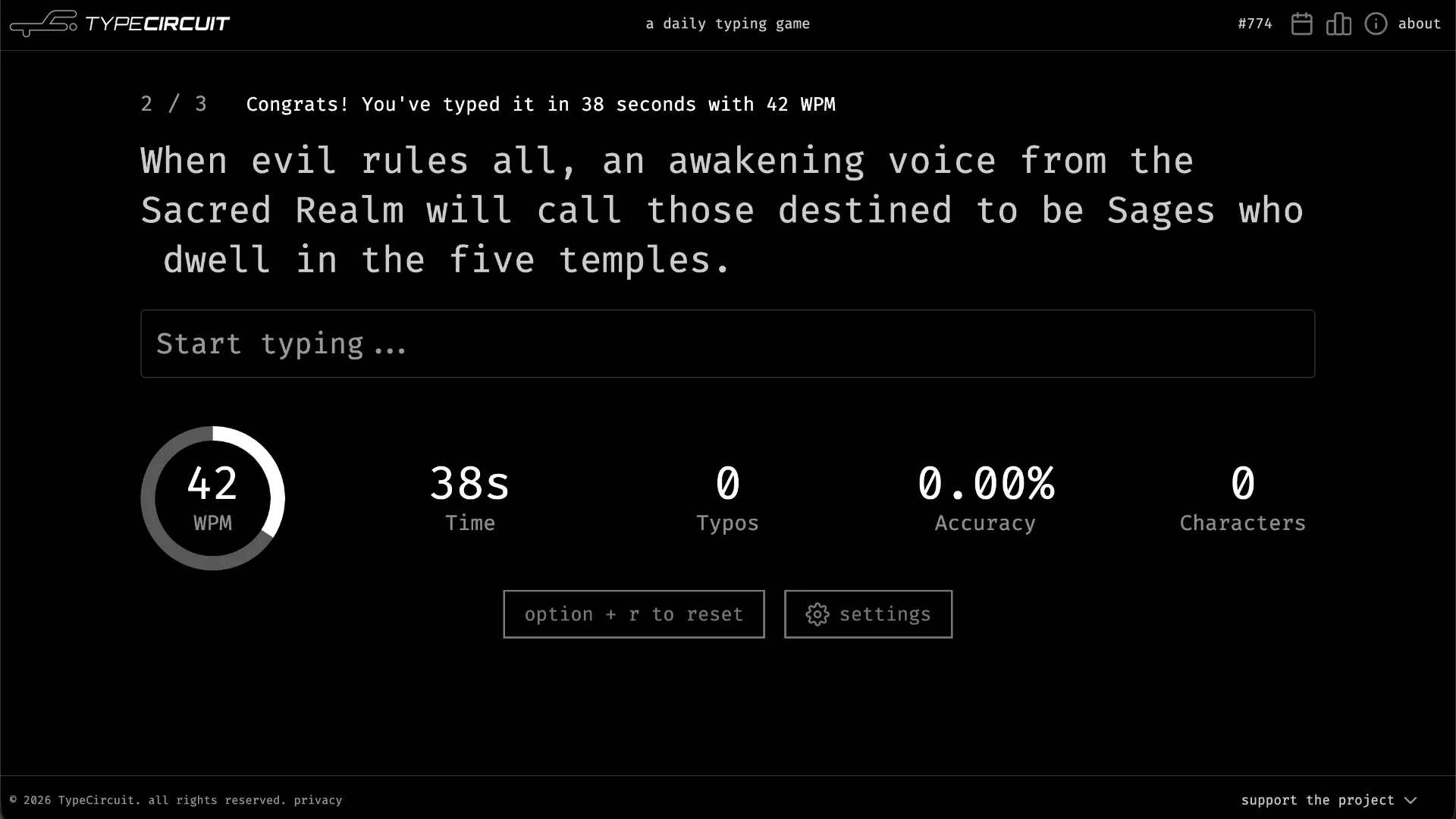
The game continuously measures your performance, including typing speed, elapsed time, accuracy, typo count, and total characters. After completing the circuit, you can review your results and share them with friends.
TypeCircuit was originally launched in 2024 and received updates in 2026 introducing additional typing modes, appearance themes, daily streaks, and other improvements.
The game is available directly at typecircuit.com and requires no download or account registration.
How Does TypeCircuit Work?
The main challenge is called the Circuit of the Day.
A standard circuit consists of three short quotes selected from video games, films, or anime. Every player receives the same daily circuit, making it possible to compare results fairly.
The basic objective is straightforward:
- Read the quote displayed on the screen.
- Reproduce the text using your keyboard.
- Type quickly without sacrificing accuracy.
- Complete all three quotes in sequence.
- Review your average speed, total time, accuracy, and mistakes.
Each quote represents one stage of the circuit. A progress indicator such as 1/3 shows which stage you are currently completing.
Once you finish a quote, the game moves toward the next stage. After the third quote, the circuit is complete and your overall results become available.
Unlike Wordle, TypeCircuit does not contain a hidden answer that you need to discover. The challenge comes from accurately reproducing visible text under time pressure.
TypeCircuit Rules Explained
TypeCircuit combines a familiar typing test with a daily competitive format.
1. Complete Three Quotes
The standard daily circuit contains three quotes. These passages are drawn from popular entertainment, including video games, movies, and anime.
You must complete the displayed text for each stage to finish the full circuit.
2. Type the Displayed Characters
In the default typing mode, you should reproduce the quote as presented, including its letters, capitalization, spacing, and punctuation.
The game also offers settings that simplify the required text, including Letters Only and All Lowercase modes.
3. Watch Your Mistakes
Typing errors are detected immediately. Incorrect input is highlighted visually, allowing you to recognize where your typing diverges from the displayed quote.
An error indicator can also appear near the current stage counter.
Mistakes affect your accuracy and typo statistics, so pressing keys as quickly as possible is not always the best strategy.
4. Track Your Performance
TypeCircuit updates its typing statistics as you progress.
The main measurements are:
| Statistic | What It Measures |
|---|---|
| WPM | Your typing speed in words per minute |
| Time | Time spent completing the typing challenge |
| Typos | Number of typing mistakes detected |
| Accuracy | Percentage of typing input recorded as accurate |
| Characters | Total number of characters processed |
These measurements help you compare speed and precision rather than focusing on completion time alone.
5. Finish the Daily Circuit
After completing all three quotes, the game presents your overall performance and individual round results.
You can share your results with friends or compare them through the game's competitive features.
A fresh circuit becomes available each day.
How to Play TypeCircuit
Getting started with TypeCircuit takes only a few steps.
Step 1: Open the Official Website
Visit TypeCircuit using a browser on a device with a keyboard.
The homepage provides access to the current typing circuit, settings, past circuits, and leaderboard.
You can play for free without creating an account.
Step 2: Start Today's Circuit
Select the play option to begin the current daily challenge.
The game displays the first quote and a text-entry field labeled 'Start typing...'.
The stage indicator shows your progress through the three-part circuit.
Step 3: Type the Quote
Begin typing the displayed passage as accurately as possible.
For example, imagine the game presents this fictional practice sentence:
Displayed text:
The portal opens at dawn.
Your goal is to type those characters in the correct order, including the capital letter and punctuation when the default mode requires them.
This sentence is an illustrative example, not a verified quote from today's circuit.
While typing, watch the live WPM, Time, Typos, Accuracy, and Characters counters.
Step 4: Complete All Three Rounds
Finish the first quote and continue through the remaining two stages.
Try to maintain a consistent typing rhythm as the passages change.
The game includes a cooldown setting controlling the pause between stages. You can choose a shorter cooldown if you prefer moving through the circuit more quickly.
Step 5: Review and Share Your Results
After the third quote, TypeCircuit displays your completed circuit statistics.
Look at your average WPM, overall accuracy, typo count, and completion time.
You can share the results with friends and compare how well you performed against players completing the same daily quotes.
Return the next day for another typing challenge.
Understanding TypeCircuit's WPM and Accuracy Scores
Two statistics are especially important in TypeCircuit: typing speed and accuracy.
Words Per Minute (WPM)
WPM measures how quickly you type.
Typing tests commonly calculate this using a standardized word length of five characters, although individual websites may apply their own timing and calculation rules.
For example, 300 characters typed in one minute would represent approximately 60 standardized words per minute before accounting for any game-specific adjustments.
TypeCircuit displays a live WPM measurement and reports average performance across the circuit.
A higher WPM indicates faster typing, but speed alone does not describe how carefully the passage was reproduced.
Typing Accuracy
Accuracy measures how consistently your input matches the expected text.
A player typing at 100 WPM with many mistakes may produce a less impressive overall performance than someone typing slightly slower with excellent accuracy.
TypeCircuit displays accuracy as a percentage and tracks typing errors separately.
Typo Count
The Typos counter records mistakes detected while typing.
This makes it easier to distinguish a clean, controlled run from a fast but error-prone attempt.
If your WPM improves while your typo count increases significantly, you may be pushing beyond your comfortable typing rhythm.
Completion Time
The Time statistic shows how long the typing challenge takes.
Because the quotes can vary in length, comparing WPM and accuracy alongside time is generally more informative than comparing seconds alone.
Example Results
A completed circuit might produce a shareable summary resembling this:
TypeCircuit #732

WPM:       112 avg
Accuracy:  96.68% avg
Typos:     8 / 272 characters
Time:      29 seconds
Circuit:   3/3 completed
These figures come from a player-shared result for Circuit #732 in September 2026. They illustrate the performance information included in TypeCircuit's results.
Your own numbers depend on your typing speed, accuracy, and the quotes in the circuit.
TypeCircuit Game Modes and Settings
One of TypeCircuit's useful features is the ability to customize the typing experience.
Open the Settings panel to adjust the typing rules, number of quotes, cooldown duration, and visual theme.
Letters Only Mode
Letters Only simplifies the text by focusing on alphabetic characters rather than the full punctuation-heavy passage.
This is helpful for players who want to practice letter sequences without spending as much attention on punctuation and other symbols.
It can also be useful for beginners developing keyboard familiarity.
All Lowercase Mode
All Lowercase removes the need to reproduce uppercase letters.
For example, a sentence such as 'The Adventure Begins' becomes a lowercase typing exercise.
This reduces the need to use Shift and helps players concentrate on speed and rhythm.
Three Quotes or One Quote
The Circuit settings allow players to choose between:
- 3 Quotes: The standard three-stage typing circuit.
- 1 Quote: A shorter session focused on a single passage.
The one-quote option is useful for quick practice or when you want to test your typing without completing the full daily circuit.
Cooldown Settings
TypeCircuit offers two cooldown options:
- Normal: The standard pause between rounds.
- Short: A reduced pause for players who prefer faster transitions.
The developer has specifically highlighted Short Cooldown as an option for people who dislike waiting between quotes.
Appearance Themes
TypeCircuit offers multiple visual themes, including:
- Default
- Hacker
- Amber
- Light
- Game Boy
These themes change the appearance of the typing interface, allowing players to choose a visual environment that feels comfortable.
The darker themes may appeal to players who prefer a terminal-inspired appearance, while Light mode provides a brighter alternative.
Keyboard Shortcuts in TypeCircuit
TypeCircuit includes keyboard shortcuts that make it easier to control a typing session.
| Shortcut | Action |
|---|---|
| Alt + R | Reset the current typing progress |
| Esc | Close a modal and return focus to the typing input |
Alt + R is useful when you want to restart after a poor beginning or test your performance again.
The developer added Escape-based modal handling following player feedback about navigating the interface without relying on the mouse.
Keyboard-focused controls are particularly valuable in a typing game because they reduce unnecessary interruptions.
Daily Circuits, Past Circuits, and Leaderboards
TypeCircuit is designed around short daily challenges rather than an endless stream of random typing tests.
Circuit of the Day
A new set of three quotes becomes available each day.
The daily circuit is shared among players, making it possible to compare performance on identical text.
Every circuit has its own identifying number, which also appears in shared results.
Past Circuits
The website includes a Past Circuits section.
This lets players return to previous challenges and review earlier results or replay older circuits where available.
Past circuits are particularly useful if you want more typing practice after completing today's challenge.
Leaderboard
The website also provides a leaderboard for comparing typing performance.
Competition adds an extra incentive to improve your speed and reduce mistakes.
Rather than simply completing a typing passage, you can try to achieve a better result than other players.
Daily Streaks
TypeCircuit includes daily streak tracking, rewarding players who regularly return for new typing challenges.
Daily streaks can help turn short typing sessions into a consistent practice habit.
Sharing Results
After finishing a circuit, players can share their performance statistics.
The developer has also described an option to save an image of the results, making it easier to post your score or challenge friends.
Sharing WPM and accuracy provides a straightforward comparison because players completing the same daily circuit face the same quotes.
TypeCircuit Tips and Strategies
1. Prioritize Accuracy Before Maximum Speed
The most common mistake in typing speed games is trying to type faster than you can comfortably control.
A few extra seconds spent typing cleanly can be more valuable than rushing through a quote while constantly correcting errors.
Start at a comfortable speed and increase your pace as you become more confident.
2. Look Ahead While Typing
Avoid focusing exclusively on the character directly under your cursor.
Try reading several characters or words ahead so your fingers can prepare for upcoming letter combinations.
This helps maintain a more consistent rhythm, particularly when a quote contains unfamiliar names or punctuation.
3. Practice Difficult Letter Combinations
Some words are difficult to type quickly because their letters require awkward finger movements.
If you repeatedly struggle with certain combinations, practice them outside the daily circuit.
Improving these weak points can reduce typing interruptions and increase your average WPM.
4. Use Letters Only for Focused Practice
If punctuation is slowing you down, try Letters Only mode.
This can help isolate basic keyboard speed from the additional challenge of Shift combinations and punctuation placement.
Return to the default mode when you want to practice reproducing complete quotes accurately.
5. Experiment with All Lowercase
Capital letters can interrupt your typing rhythm, particularly if you are still building confidence using Shift.
All Lowercase provides a simpler challenge that can help you develop speed before returning to case-sensitive text.
6. Avoid Watching the WPM Counter Constantly
TypeCircuit updates performance statistics live, but frequently looking away from the quote can interrupt your concentration.
Focus on the displayed text during the challenge and examine the statistics after each stage.
The best way to improve your WPM is usually to type more smoothly, not to monitor the number after every few keystrokes.
7. Choose a Comfortable Theme
Experiment with the available themes to find one that makes the text easy to read.
A comfortable contrast level can help you recognize upcoming characters and errors without unnecessary visual strain.
8. Use Short Cooldown to Maintain Momentum
If long pauses between quotes disrupt your typing rhythm, select the Short Cooldown setting.
This lets you move through the circuit with fewer interruptions.
9. Review Both Speed and Accuracy
After completing a circuit, compare your WPM, accuracy, and typo count rather than focusing only on your fastest passage.
A small speed improvement accompanied by much better accuracy can represent meaningful progress.
10. Play Regularly
Short, consistent typing sessions can help develop keyboard familiarity and muscle memory.
TypeCircuit's daily format provides a convenient reason to practice without committing to a long training session.
TypeCircuit vs. Other Typing Games
TypeCircuit belongs to the broader family of browser-based typing challenges, but its daily circuit format gives it a distinct identity.
| Game | Main Experience | Key Difference |
|---|---|---|
| TypeCircuit | Complete three daily pop-culture quotes | Daily circuits, WPM tracking, streaks, and shareable results |
| Monkeytype | Customizable typing speed tests | Extensive test durations, word lists, and practice settings |
| TypeRacer | Race against other typists | Multiplayer competition based on completing passages quickly |
| Nitro Type | Competitive typing races with vehicles | Racing progression and multiplayer competition |
TypeCircuit's main appeal is its combination of daily consistency and recognizable entertainment quotes.
Unlike traditional typing websites that offer unlimited generic passages, its daily format gives players a specific challenge to return to.
The three-quote structure also provides a useful balance between variety and brevity.
Is TypeCircuit Free to Play?
Yes. TypeCircuit is free to play on its official website.
You do not need to purchase software, download an application, or create an account to start typing.
The website also includes an optional 'Support the project' link for visitors who want to support its development.
The regular typing game remains accessible without making a contribution.
TypeCircuit is best experienced on a device with a physical keyboard, where fast and accurate typing is more comfortable than using an on-screen mobile keyboard.
Who Should Play TypeCircuit?
TypeCircuit is a good choice for players who enjoy:
- Free daily browser games.
- Typing speed and accuracy challenges.
- Video game, movie, and anime quotes.
- Comparing WPM results with friends.
- Short keyboard practice sessions.
- Improving typing performance through regular practice.
- Competing on leaderboards and maintaining daily streaks.
It is particularly appealing to players who enjoy the competitive side of typing tests but prefer a short daily format rather than lengthy practice sessions.
TypeCircuit is not a traditional word guessing or vocabulary puzzle. You do not need to discover hidden words, solve clues, or answer trivia questions. Your main challenge is reproducing the given text quickly and correctly.
Frequently Asked Questions
What is TypeCircuit?
TypeCircuit is a free daily typing game where players type three quotes from video games, movies, and anime while tracking speed, accuracy, time, and mistakes.
How many quotes are in a TypeCircuit game?
The standard daily circuit contains three quotes. The settings also offer a one-quote option for shorter sessions.
Is TypeCircuit free?
Yes. TypeCircuit is free to play in a web browser, with no required account or purchase.
Does TypeCircuit have a new challenge every day?
Yes. A new circuit of quotes becomes available daily.
What does WPM mean in TypeCircuit?
WPM stands for Words Per Minute. It measures typing speed and is one of the main statistics shown during and after a circuit.
Does TypeCircuit track typing mistakes?
Yes. The game displays a live Typos counter and an Accuracy percentage. Incorrect input also receives visual feedback.
Can I play TypeCircuit without punctuation?
The game offers a Letters Only mode that simplifies the typing challenge by focusing on letters rather than the complete punctuation-heavy text.
Can I disable capital letters?
Yes. The All Lowercase setting reduces the challenge of uppercase letters.
How do I restart TypeCircuit?
Press Alt + R to reset the current typing progress.
Can I change the game's appearance?
Yes. Available themes include Default, Hacker, Amber, Light, and Game Boy.
What is Short Cooldown?
Short Cooldown reduces the waiting period between typing stages, helping players maintain a quicker pace throughout the circuit.
Can I play previous TypeCircuit challenges?
Yes. The website includes a Past Circuits section for accessing earlier challenges and results.
Can I share my TypeCircuit score?
Yes. TypeCircuit provides shareable results, and the developer has described an option to save a results image.
Does TypeCircuit have a leaderboard?
Yes. The official website includes a leaderboard where players can compare their typing performance.
Does TypeCircuit support daily streaks?
Yes. Daily streak tracking was included among the features highlighted in the game's 2026 updates.
Are TypeCircuit quotes from real games and movies?
Yes. The game's quote collection includes passages from popular video games, movies, and anime.
Is TypeCircuit similar to Wordle?
Both are browser-based games with daily challenges, but their mechanics are completely different. Wordle involves guessing a hidden word, while TypeCircuit tests how accurately and quickly you can reproduce displayed text.
Conclusion
TypeCircuit turns a traditional typing speed test into a fun daily challenge by combining three recognizable entertainment quotes with live performance statistics, customizable modes, and friendly competition.
Its short format makes it approachable for casual players, while WPM tracking, accuracy measurements, leaderboards, and shareable results give competitive typists reasons to keep improving.
Whether you want to sharpen your keyboard skills, challenge friends, or simply enjoy a few minutes of daily typing practice, TypeCircuit offers an accessible experience without requiring an account or download.
Ready to test your typing speed? Play TypeCircuit free online and see how quickly you can complete today's circuit.