What Is Zaggle?
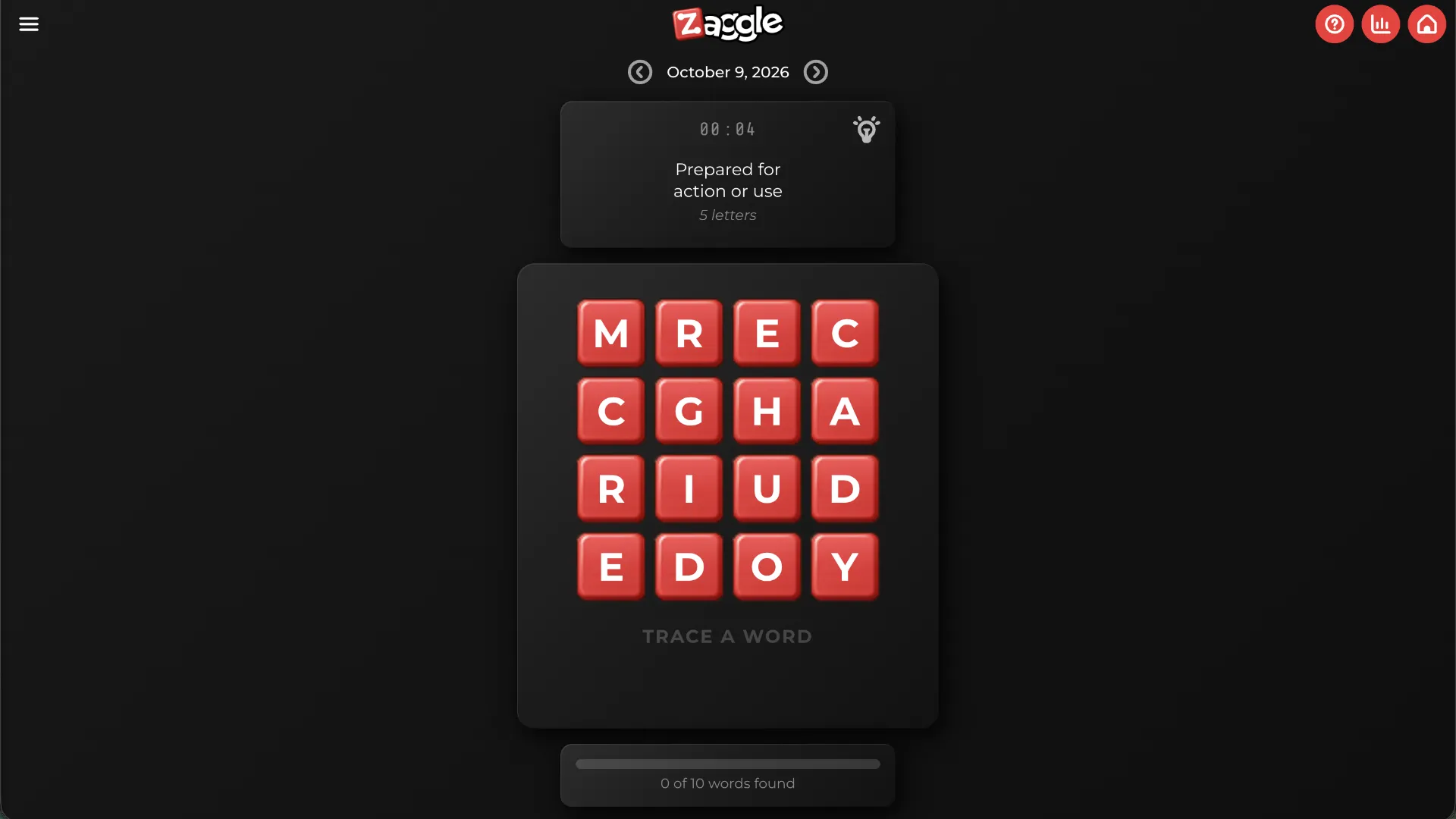
Zaggle is a free daily browser-based word puzzle that combines the clue-solving challenge of a crossword with the letter-connecting mechanics of Boggle and word-search games. Instead of typing answers into crossword squares, players trace paths through a grid of letters to spell words matching the clues.
The puzzle features five hidden words. Each time you find the correct answer, its letters disappear, the remaining letters fall into the empty spaces, and new letters enter from above. This creates a constantly changing board where every solution reshapes the next challenge.
Developed by Lukas Stanley of Fox Point Games, Zaggle is designed for short daily play sessions. It offers both Competitive and Casual modes, making it suitable for players who want to race against the clock and those who prefer solving puzzles without worrying about their statistics.
The developer describes Zaggle as a compact combination of a crossword and a word search. Its defining feature is the interaction between word clues, connected letter paths, and a cascading grid.
Zaggle Rules and Core Mechanics
Zaggle has a simple objective: solve all five clue-based words and completely clear the board.
The game follows several important rules:
- Follow the clue: A clue appears above the letter grid, pointing toward the word you need to find.
- Connect adjacent letters: Each consecutive letter must touch the previous one horizontally, vertically, or diagonally.
- Use each tile once: You cannot reuse the same letter tile within a single word.
- Trace the complete answer: Drag across the letters or tap connected tiles individually to construct your answer.
- Automatic submission: When you complete the correct word, the game recognizes it automatically. There is no separate Submit button.
- Cascading letters: Successfully matched letters disappear, existing tiles fall downward, and new letters appear above.
- Clear the puzzle: Continue solving the clues until all five words are found and the board is empty.
Unlike a traditional word search, the letters do not need to form a straight line. Your path can change direction as long as every move connects adjacent tiles.
The Cascading Grid Twist
The most distinctive part of Zaggle is its changing letter grid.
Imagine the clue is 'A young dog', and the answer is PUPPY. If the letters P, U, P, P, and Y form a connected path through the grid, you can trace them in sequence to solve the clue.
Once the answer is completed, those five letter tiles disappear. Tiles above the removed letters fall into the gaps, and new letters enter the grid.
That means solving one word can change the available paths for the next word. A sequence that was impossible to trace before a cascade might become possible afterward.
This makes Zaggle more dynamic than a conventional crossword or static word search. Players need to understand each clue while continually adapting to the changing arrangement of letters.
How to Play Zaggle
Zaggle runs directly in your browser. The basic daily puzzle takes only a few steps to learn.
- Open Zaggle and select a mode. Visit playzaggle.com and choose Competitive or Casual. Competitive mode records your completion time and contributes to your statistics, while Casual mode lets you play without recording the result.
- Read the current clue. Look at the clue above the grid and think of a word that fits its meaning. Consider possible answers before selecting letters.
- Trace the word through connected tiles. Drag your mouse or finger across adjacent letters, including diagonal connections. Alternatively, tap letters one at a time. If you make a mistake, tap an earlier selected tile to backtrack or start a new selection.
- Watch the grid change. As soon as you spell the correct answer, the selected letters disappear automatically. Remaining letters drop into place, new letters enter from above, and you can continue solving the puzzle.
- Find all five words. Repeat the process until the grid is cleared. Review your results, check your Competitive statistics if applicable, and return for another daily puzzle or explore the archive.
The main challenge is recognizing the answer and finding a valid connected path through the letters. You do not need to type words or manually confirm successful answers.
Competitive Mode vs. Casual Mode
Zaggle offers two approaches to the same core puzzle experience.
Competitive Mode
Competitive mode is designed for players who enjoy timed word challenges.
- Your completion time is tracked.
- Completed puzzles contribute to your recorded statistics.
- Your results can be compared with those of other Competitive players.
- The statistics interface includes completed puzzles, average completion time, and global rank information.
- Completion times may be submitted anonymously to calculate percentile rankings.
Because speed matters, quickly identifying answers and selecting the correct letter paths can improve your performance.
Casual Mode
Casual mode provides the same clue-solving and letter-tracing gameplay without adding completed puzzles to your recorded Competitive statistics.
It is a good choice for learning the mechanics, experimenting with possible word paths, or enjoying the puzzle without trying to achieve a personal-best time.
Players can choose their preferred mode before beginning.
How Do Hints Work in Zaggle?
Zaggle includes a hint feature for moments when you cannot identify the next letter in the answer.
Selecting the Hint control offers to reveal the position of the next letter in the word. This can help you continue a difficult path without revealing the entire answer.
Hints have a time penalty: Using one adds 30 seconds to your timer.
This creates a trade-off in Competitive mode. A hint might save you from spending several minutes searching, but the additional time can affect your final result.
For example, if you have already spent 45 seconds looking for the next letter, revealing its position may be worthwhile. However, if you are close to finding the path yourself, avoiding the penalty could produce a faster final time.
The best approach is to use hints selectively rather than immediately whenever a clue becomes difficult.
Zaggle Strategy Tips
1. Solve the Clue Before Tracing
Start by interpreting the clue and identifying likely answers. Knowing the target word makes it much easier to search for a connected letter sequence.
If a clue suggests an animal, object, action, or common expression, consider several possible answers before attempting a path.
2. Search for Distinctive Letter Combinations
Some letter combinations are easier to recognize than others. If your expected answer contains a relatively uncommon sequence, look for those letters first.
For example, a word containing QU or a repeated consonant may offer a useful starting point for locating its path.
3. Remember That Diagonals Count
A frequent beginner mistake is looking only for horizontal and vertical connections. Zaggle allows diagonal movement, giving you up to eight neighboring directions from an interior tile.
If a word appears impossible to spell, check the diagonal connections before abandoning your answer.
4. Avoid Reusing the Same Tile
Even if a word contains repeated letters, each occurrence must come from a different tile.
For example, tracing LETTER requires two distinct T tiles and two distinct E tiles. A path that revisits an earlier tile is not valid.
5. Adapt After Every Cascade
Do not rely on the previous arrangement of the board. After each successful word, letters fall and new tiles appear, changing the possibilities.
Read the next clue and inspect the updated grid instead of assuming familiar letter positions have remained unchanged.
6. Use Tap Controls for Precise Paths
Dragging is convenient for quick selections, but tapping individual tiles can help when a word has an awkward path or when nearby letters are easy to confuse.
You can also tap an earlier letter in your selected path to backtrack without completely restarting.
7. Balance Speed Against Hint Penalties
In Competitive mode, a successful hint may shorten the time needed to solve a difficult word, but it also adds 30 seconds to the timer.
Consider whether you are genuinely stuck before requesting assistance. Casual mode is useful for developing your skills without focusing on ranked times.
Is Zaggle Free to Play?
Yes. Zaggle is available free through its official website, with no download required.
Fox Point Games describes its games as free and ad-free, supported through optional player memberships and donations.
The game stores progress and gameplay statistics locally in your browser. You do not need to create an account to start playing.
In Competitive mode, anonymous completion-time data may be submitted to the game's database to calculate global percentile rankings.
Zaggle also offers an optional email reminder feature for players who want to receive a notification when the next daily puzzle becomes available.
Can You Play Previous Zaggle Puzzles?
Yes. The official website includes a Zaggle Archive accessible from the main game interface.
The archive provides a way to explore earlier puzzles instead of waiting for the next daily challenge.
This is particularly useful for players who have recently discovered Zaggle and want more practice with its unusual combination of crossword clues and falling letter tiles.
For the regular daily experience, players can return each day to find another puzzle.
Zaggle vs. Wordle, Boggle, and Crosswords
Zaggle shares features with several established word games but combines them in a distinctive way.
| Game | Main Mechanic | Key Difference |
|---|---|---|
| Zaggle | Solve clues by tracing adjacent letters | Correct words disappear and the grid cascades |
| Wordle | Guess a hidden word using letter feedback | Players type guesses instead of tracing paths |
| Boggle | Find valid words by connecting neighboring letters | Typically emphasizes discovering words without individual crossword-style clues |
| Crossword | Solve definitions and fill intersecting answers | Answers are typed or written into fixed positions |
| Word Search | Locate hidden words in a letter grid | Traditional word searches generally use straight-line words and static grids |
The closest comparison is a crossword combined with a Boggle-style interface. The cascading letters add another layer of interaction that changes the board after every successful answer.
Unlike Wordle, Zaggle is not primarily about eliminating possible letters through color-coded feedback. Instead, the challenge comes from understanding clues and tracing valid paths through the current grid.
Who Should Play Zaggle?
Zaggle is especially suitable for players who enjoy short, language-focused challenges with a visual component.
It is a good choice for:
- Crossword enthusiasts who like solving clues but want a different interface.
- Boggle and word-search fans who enjoy connecting letters into meaningful words.
- Daily puzzle players looking for a quick game to add to their routine.
- Competitive players who enjoy timing their performance and comparing results.
- Casual players who prefer solving word puzzles without recorded statistics.
- Vocabulary enthusiasts interested in combining language knowledge with pattern recognition.
The rules are easy to understand, but the shifting board and multiple possible letter paths can make each puzzle surprisingly engaging.
Who Created Zaggle?
Zaggle was created by Lukas Stanley, an independent game developer associated with Fox Point Games.
In July 2026, Lukas introduced Zaggle to the Reddit word-games community, describing it as a new daily game blending crossword and word-search mechanics into a compact experience that can be completed in a few minutes.
Fox Point Games also publishes several other browser-based puzzles, including Wordloop, Wordsmyth, Dodeku, Quizmoji, and Agent Caesar.
The developer's focus is on accessible, shareable daily games that players can return to regularly.
Frequently Asked Questions
How many words are in a Zaggle puzzle?
The standard puzzle interface displays five words to find. Players solve the clues and trace each answer through the letter grid until all five words are completed.
Can you connect diagonal letters?
Yes. Letters can be connected horizontally, vertically, or diagonally, provided each new letter is adjacent to the previous one.
Can you use the same letter twice?
You cannot use the same tile twice within one word. Repeated letters in an answer must come from separate tiles.
What happens after finding a word?
The selected letters disappear automatically. Other letters fall downward into the empty spaces, and new letters appear from above.
Do you need to press Submit?
No. Zaggle automatically recognizes a correctly traced answer, whether you select letters by dragging or tapping.
Does Zaggle have a timer?
Yes. Competitive mode tracks completion time and uses it for statistics and comparisons with other players. Casual mode does not count completed puzzles toward Competitive statistics.
Is there a hint feature?
Yes. A hint can reveal the position of the next letter in the word, but using it adds 30 seconds to your timer.
Can I play Zaggle on my phone?
Zaggle supports tap and drag interactions, making its word-tracing mechanics suitable for touchscreen devices as well as desktop browsers.
Can I play older puzzles?
Yes. Zaggle includes an archive linked from the official website.
Who developed Zaggle?
Zaggle was developed by Lukas Stanley of Fox Point Games.
Final Thoughts
Zaggle stands out among daily word games by blending three satisfying elements: interpreting crossword-style clues, finding connected letter paths, and watching the grid change as successful answers disappear.
The five-word format makes each session approachable, while the Competitive timer, optional hints, and cascading letter mechanics add enough variety to reward repeated play.
Whether you want a quick word puzzle during a break or a timed challenge against other players, Zaggle offers an enjoyable alternative to conventional Wordle-style guessing games.
Ready to trace your first word? Visit Zaggle, choose your preferred mode, and see how quickly you can clear today's grid.