What Is Definitions?
Definitions is a free daily word puzzle from PZL Games that challenges you to reconstruct three scrambled dictionary definitions. Instead of guessing a hidden word or arranging individual letters, you must figure out where entire words belong.
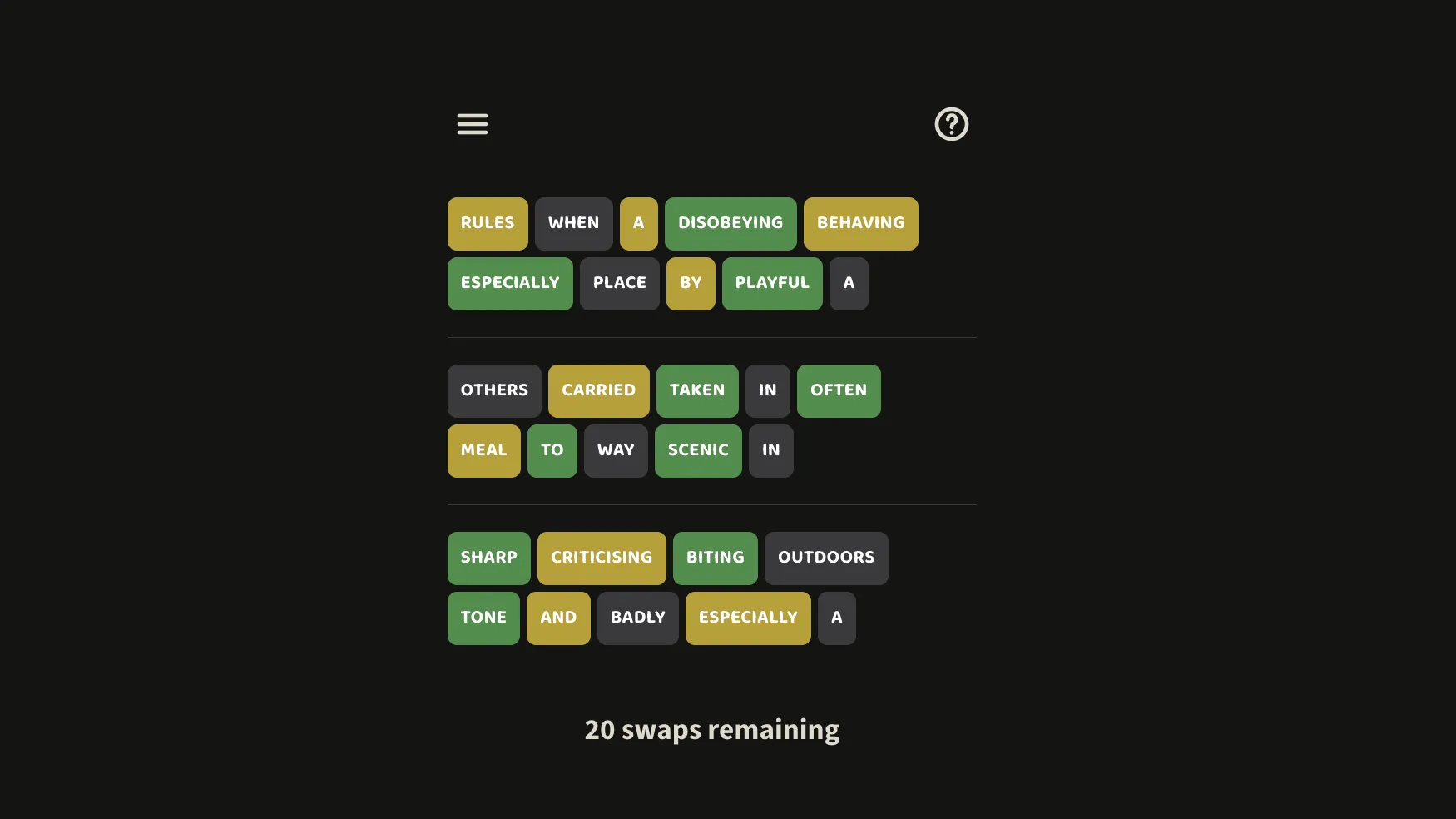
Each puzzle presents three rows of mixed-up words. Every row represents one dictionary definition, but words have been shuffled across the board. Your goal is to restore all three definitions by swapping words into their correct positions.
The twist is that you are not told which words the definitions describe. You must recognize familiar dictionary language, identify which words belong together, and use color-coded feedback to work out the correct arrangement.
Definitions combines vocabulary knowledge, sentence structure, and logical deduction into a compact daily challenge. A new puzzle appears each day, and previous puzzles remain available through the archive.
How Does Definitions Work?
The game uses a simple word-swapping mechanic with three rows of fixed lengths.
Select one word, then select another to exchange their positions. After each swap, the game shows colored feedback indicating how close each word is to its correct location.
Understanding the Color Clues
- Green: The word is in the correct row and the correct position. It locks into place.
- Orange: The word belongs in its current definition but occupies the wrong position.
- Grey: The word does not belong in its current definition.
In high-contrast mode, green is replaced by orange and orange by blue.
Unlike Wordle, where colors describe individual letters, Definitions uses feedback for complete words. This lets you identify both the correct sentence and the position of each word.
The 20-Swap Challenge
Each daily puzzle is designed to be solvable in 10 swaps, but you receive a budget of 20 swaps.
This gives you room to experiment, although randomly exchanging words can quickly waste your available moves.
You must correctly reconstruct all three definitions to complete the challenge.
How to Play Definitions
- Open today's puzzle. Visit PZL Games and launch Definitions. You will see three rows of scrambled dictionary words. The game also offers a tutorial explaining its feedback system.
- Examine the words. Look for meaningful groups, recognizable phrases, and vocabulary that could describe a particular object, action, or concept. Remember that the original dictionary headwords are not shown.
- Swap two words. Click or tap one word, then another, to exchange their positions. Words may need to move between different definition rows, not just within the same sentence.
- Read the color feedback. Keep green words in place, rearrange orange words within their rows, and look for another row for grey words. Use each swap to improve the arrangement.
- Complete all three definitions. Continue moving words into their correct positions until every row forms its intended dictionary definition, ideally using as few of your 20 swaps as possible.
Example: Rebuilding Dictionary Definitions
Imagine a simplified puzzle whose correct definitions are:
- A young dog
- The largest planet
- To move quickly
The initial scrambled rows might look like this:
| Row | First word | Second word | Third word |
|---|---|---|---|
| 1 | planet | young | quickly |
| 2 | The | dog | largest |
| 3 | To | move | A |
In this example, young is already in the correct position in the first row, so it would appear green. planet and quickly belong in different definitions, so they would appear grey.
In the second row, largest belongs in that definition but needs to move to another position, so it would appear orange.
The objective is to move the misplaced words into their correct rows and positions until all three definitions read properly.
This is an illustrative example, not an actual daily puzzle.
Tips and Strategies for Definitions
1. Identify Distinctive Words First
Start with unusual nouns, verbs, or adjectives that clearly belong to a particular topic. A word such as 'nautical' is much easier to associate with a maritime definition than a common word such as 'the'.
Move distinctive words into their likely rows before spending swaps fine-tuning sentence order.
2. Build Around Green Words
Green words are confirmed and locked. Treat them as anchors for the surrounding sentence. Their positions can help you determine where articles, prepositions, and descriptive words belong.
3. Separate the Three Definitions
The puzzle is easier when you first identify which words belong to each definition and then arrange those words into the correct order.
Trying to perfect one sentence while it still contains words from unrelated definitions can waste valuable swaps.
4. Recognize Dictionary Writing Patterns
Dictionary definitions frequently use familiar grammatical structures, including:
- 'A person who...'
- 'The quality of...'
- 'An object used for...'
- 'To move...'
Recognizing these patterns helps you reconstruct a sentence even when you cannot immediately identify the word it describes.
5. Watch Out for Repeated Words
Common words such as 'a', 'of', and 'the' may appear in multiple definitions.
Feedback accounts for how many copies of a word belong in each row. An extra copy may appear grey even when another instance of the same word belongs there.
Do not assume identical words are interchangeable without checking the feedback.
6. Make Every Swap Count
You have 20 swaps, while a clean solution can be achieved in 10. Prioritize moves that place a distinctive word in its correct row or fix multiple misplaced words simultaneously.
Avoid random swaps when you already have useful information about the remaining positions.
Is Definitions a Daily Game?
Yes. Definitions publishes a new puzzle every day, with a separate calendar entry for each challenge.
Unlike daily games that only allow access to the current puzzle, Definitions includes an archive where you can revisit previous days and practice additional puzzles.
This makes it suitable both for a quick daily vocabulary challenge and for longer puzzle-solving sessions.
Is Definitions Free to Play?
Yes. Definitions is available to play for free through the PZL Games website.
It runs in a browser and uses straightforward word selection and swapping controls. You do not need to install a dedicated application to try the game.
Definitions vs. Wordle
Although Definitions uses familiar color-coded feedback, its gameplay is different from Wordle.
| Feature | Definitions | Wordle |
|---|---|---|
| Main objective | Rebuild three dictionary definitions | Guess a hidden five-letter word |
| Main action | Swap complete words | Enter letter guesses |
| Feedback | Word position and correct definition row | Letter presence and position |
| Puzzle structure | Three scrambled sentences | One hidden word |
| Move limit | 20 swaps | 6 guesses |
| Main skills | Vocabulary, grammar, deduction | Vocabulary, spelling, deduction |
Definitions is especially appealing to players who enjoy word puzzles but want something beyond traditional letter guessing.
Who Should Play Definitions?
Definitions is worth trying if you enjoy daily word games, vocabulary challenges, sentence unscrambling, or logic puzzles based on language.
It rewards players who can recognize familiar grammatical structures and use feedback carefully. You do not need to know every obscure dictionary word because the puzzle is about reconstructing definitions rather than guessing the words being defined.
The short format makes it a natural addition to a daily puzzle routine alongside games such as Wordle, Connections, and other PZL Games titles.
Final Thoughts
Definitions offers a distinctive take on daily word puzzles by turning dictionary entries into sentence-reconstruction challenges. Its combination of three mixed-up definitions, color-coded positional clues, and a limited swap budget creates an engaging balance of vocabulary and logical reasoning.
If you enjoy thinking about how words fit together, play Definitions on PZL Games and see whether you can restore all three definitions within the 20-swap limit.
Official game: https://pzlgames.com/games/definitions/
Official instructions: https://pzlgames.com/blog/definitions/